
Worked example · Mathematics
Standard form on a scientific calculator: negative powers without input mistakes
A microscope image is 7.20 × 10⁻² metres long. The bacterium in it is really 2.40 × 10⁻⁶ metres long. Dividing those two numbers ought to be one clean calculation, but a minus sign in the wrong place or an ordinary multiplication sign in place of the ×10^ key changes the question. This page starts with the exponent rule on paper, enters the magnification correctly, and checks the scale by fitting bacteria across a one-millimetre field of view.
Multiply the numbers, add the powers, then normalise
Standard form — also called scientific notation — writes a positive number as a × 10n, where a is at least 1 but less than 10, and n is an integer exponent. The useful part is that powers of ten follow ordinary index laws. When two are multiplied, their exponents add:
The coefficient calculation gives 6 × 3 = 18, while the power calculation gives 104+2 = 106. But 18 is not a permitted standard-form coefficient: it is too large. Moving its decimal point one place left divides the coefficient by 10, so the exponent must rise by one to keep the value unchanged. That turns 18 × 106 into 1.8 × 10⁷.
Normalising is a presentation step, not a new calculation. 18 × 106, 1.8 × 10⁷ and 18,000,000 are the same value. Only the middle one meets the convention that the first part must sit between 1 and 10.
How to enter standard form on a scientific calculator
Magnification is image length divided by actual length. Both measurements here are already in metres, so their units cancel and there is no conversion to do before the division:
Use the dedicated ×10^ key for each number. It means “attach this power of ten to the value just entered”; it is not the ordinary multiply key followed by 10. For a negative power, press the minus key immediately after ×10^. The display raises both the sign and the exponent, so you can see that the minus belongs to the power:
- (
- 7.20
- ×10^
- −
- 2
- )
- ÷
- (
- 2.40
- ×10^
- −
- 6
- )
- =
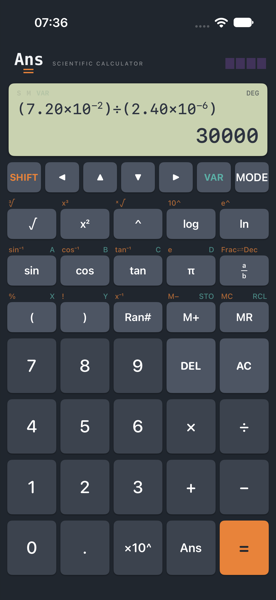
The exponent arithmetic explains why the result is large. Dividing the coefficients gives 7.20 ÷ 2.40 = 3. Dividing powers means subtracting their exponents, and subtracting a negative reverses the sign: −2 − (−6) = 4. The image is therefore thirty thousand times the actual length, not thirty thousand metres long.
A decimal result can still be a standard-form answer. The display saying 30000 does not mean the calculator ignored the powers. It is the same number written ordinarily. Choose Scientific display when you want every result formatted with a power of ten; otherwise write the final answer as 3.00 × 10⁴ yourself so its three significant figures are unambiguous.
How many bacteria fit across one millimetre?
Now suppose the microscope's field of view is 1.00 mm wide. The bacterium is 2.40 μm long. A ratio only makes sense when the numerator and denominator use the same unit. There are 1000 micrometres in a millimetre, so the quickest route is 1.00 mm = 1000 μm:
The standard-form route says the same thing. One millimetre is 1.00 × 10⁻³ m and 2.40 micrometres is 2.40 × 10⁻⁶ m. Entering those two metre values is a useful check that the negative exponents have gone in correctly:
- (
- 1.00
- ×10^
- −
- 3
- )
- ÷
- (
- 2.40
- ×10^
- −
- 6
- )
- =
So the scale estimate is about 417 bacteria across the field — but only if they are all the stated length, all point the same way and sit end-to-end with no gap or overlap. Real bacteria vary in size, curve, rotate and do not arrange themselves as a ruler. The calculation establishes the order of magnitude; it does not count a real sample.
“About 417” is a measurement answer, not a packing guarantee. The unrounded ratio is 416⅔. If a question specifically asks for the number of complete, rigid 2.40 μm objects that certainly fit, it may tell you to round down. Here both lengths are measured to three significant figures, so 417 is the appropriate estimate.
The input mistakes that change the answer
The ×10^ key is one construct
In 2.40 × 10⁻⁶, the coefficient and power together are one number. The dedicated ×10^ key keeps each coefficient and power together, so 7.20×10⁻²÷2.40×10⁻⁶ and (7.20×10⁻²)÷(2.40×10⁻⁶) both give 30000. The brackets in the worked input make that grouping visible. If you spell out the powers with the ordinary × and ^ keys, brackets become essential: 7.20×10^(−2)÷2.40×10^(−6) gives 3×10⁻⁸, or 0.00000003, because it divides by 2.40 and then multiplies by 10−6. Enter (7.20×10^(−2))÷(2.40×10^(−6)) to keep the same 30000 result.
A negative exponent does not make a negative number
10−2 means 1÷102, so 7.20 × 10⁻² is positive 0.072. The raised minus belongs only to the exponent. On Ans, pressing − immediately after ×10^ puts it there; a minus elsewhere in the line can mean subtraction or negation instead. Look at the input before pressing equals: the sign should be raised beside the exponent, not sitting on the baseline between two numbers.
Prefixes carry powers of ten
Milli means 10−3; micro means 10−6. The three-place gap is why a millimetre contains 103, or 1000, micrometres. Dividing 1.00 by 2.40 without first making the units match would give 0.4167 — numerically tidy, dimensionally wrong, and a thousand times too small.
Estimate the exponent before trusting the digits
10−2 divided by 10−6 is around 104, so a magnification near 30,000 is plausible. One millimetre divided by a few micrometres should be a few hundred. These rough checks cannot prove that 30000 and 416.6666667 are right, but they can reject 0.00000003 or 0.4167 immediately — the characteristic answers when an exponent or prefix has been mishandled.
The calculation from four directions
| Check | Working | Result |
|---|---|---|
| Index law | (6×10⁴)(3×10²) = 18×10⁶ | 1.8×10⁷ |
| Magnification, standard form | (7.20÷2.40)×10−2−(−6) | 3.00×10⁴ |
| Magnification, decimals | 0.072÷0.00000240 | 30000 |
| Field converted first | 1.00 mm = 1000 μm; 1000÷2.40 | 416.666… ≈ 417 |
| Field, standard form | (1.00÷2.40)×10−3−(−6) | 4.17×10² to 3 s.f. |
| Scale check | 2.40 μm × 416.666… | 1000 μm = 1.00 mm |
What this calculation assumes
- The image length and actual length describe the same feature in the same direction, so their ratio is the magnification.
- The stated metre, millimetre and micrometre values are measurements to three significant figures; later displayed digits do not create more precision.
- The field-of-view estimate treats every bacterium as exactly 2.40 μm long, straight and aligned edge-to-edge, with no gaps or overlaps.
- SI prefixes are exact powers of ten: milli is 10⁻³ and micro is 10⁻⁶. The uncertainty is in the measured lengths, not the conversion.
- Magnification and the number-across ratio are dimensionless after like units cancel.
Next: exact answers, and where they run out — what a calculator keeps beneath its ten-digit display.
- Free
- No ads
- No tracking
- No account
- Every sum shown in full
Worked on Ans — a scientific calculator you can own, whose dedicated ×10^ key keeps negative exponents attached to their numbers. Ans Graph is for the questions that need a curve; this one is arithmetic, so no plot was needed.